Skip to product information
 Rated 4.9/5 (10,000+ Verified Customers)

πŸŽπŸ“± Teacher & Classroom Planner App β€” Interactive Personal Planner

πŸŽπŸ“± Teacher & Classroom Planner App β€” Interactive Personal Planner

Regular price Β£19.95
Regular price Β£19.95 Sale price Β£39.90
Sold out

πŸ“± Interactive Teacher & Classroom Planner App

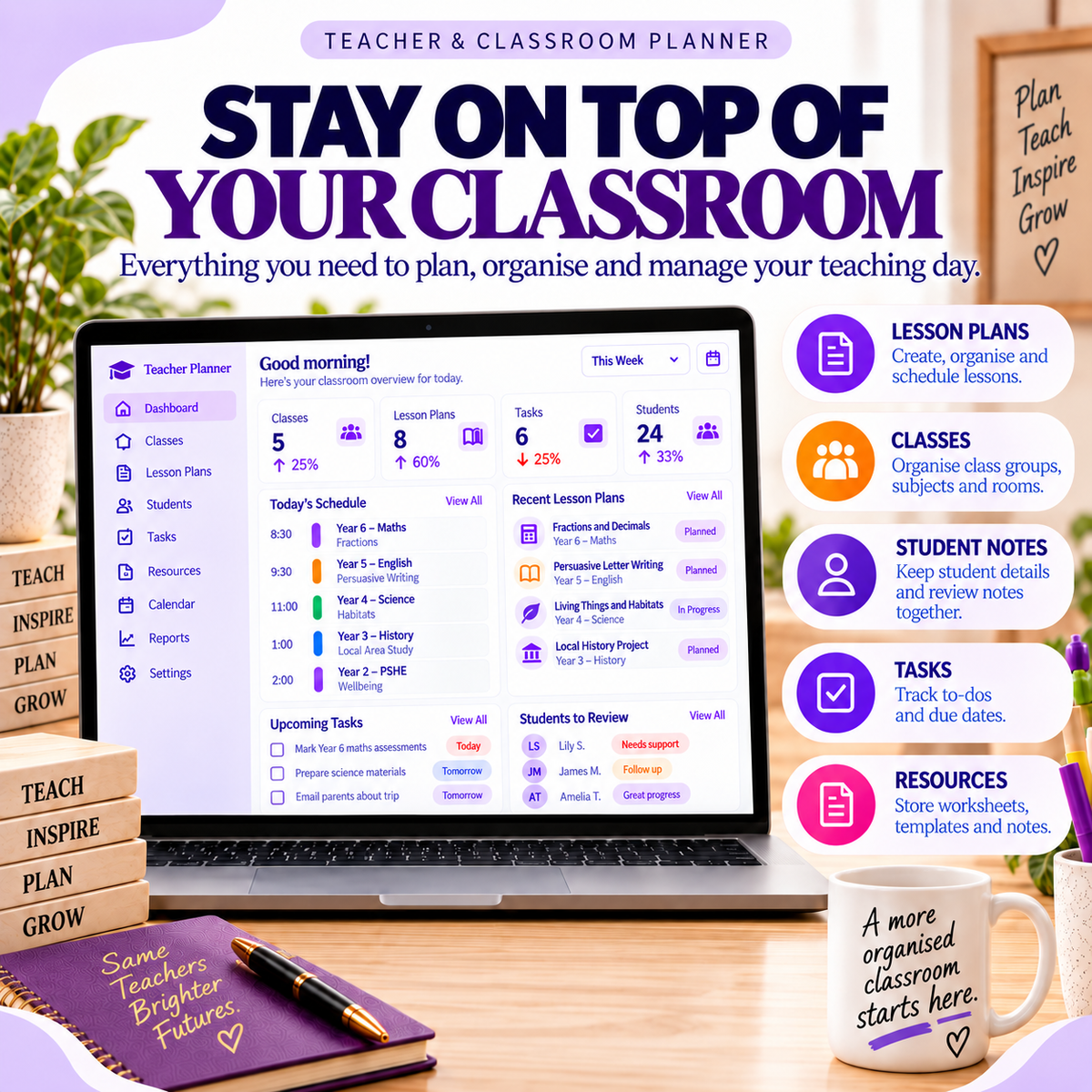
πŸ“š Organise Classes, Subjects & Timetables

πŸ“ Plan Lessons & Track Teaching Progress

πŸ‘©β€πŸŽ“ Keep Student Learning Notes Organised

βœ… Manage Teaching Tasks & Priorities

πŸ“‚ Organise Teaching Resources & Materials

πŸ“₯ Instant Download β€’ Personal Use

  • πŸ“₯ Instant Digital Download
  • πŸ”„ Lifetime Access
  • πŸ’¬ Friendly Support
  • American Express
  • Apple Pay
  • Bitcoin
  • Google Pay
  • iDEAL Wero
  • JCB
  • Klarna
  • Litecoin
  • Maestro
  • Mastercard
  • PayPal
  • Shop Pay
  • SOFORT
  • Union Pay
  • Visa

🍎 Make Everyday Teaching Organisation Simpler

Teaching involves much more than delivering lessons. There are classes to manage, lessons to prepare, student learning needs to review, resources to organise and countless small tasks competing for your attention.

Your interactive dashboard brings together your total classes, recorded lesson plans, open teaching tasks and students marked for review, helping you see your priorities from one organised workspace.

It also includes a priority view of teaching tasks and a visual breakdown of lesson preparation statuses, making it easier to see what's planned, what's ready and what's already been delivered.

Use it to keep your teaching responsibilities visible, prepare ahead and maintain useful classroom records throughout the term.

πŸ“± Everything You Need in One Interactive App

The Teacher & Classroom Planner includes:

Teaching Dashboard β€” see class totals, lesson plans, open tasks and students marked for review at a glance.

Class Organiser β€” record class names, subjects, classroom locations and teaching schedules.

Lesson Planner β€” organise lesson titles, associated classes, teaching dates and topics or objectives.

Lesson Status Tracking β€” update lessons through Planned, Ready and Delivered stages.

Student Learning Notes β€” keep individual student names, class information and brief learning observations together.

Student Review Status β€” organise learning notes using On track, Review and Follow-up indicators.

Teaching Task Manager β€” create tasks with due dates and priority levels.

Task Priority Tracking β€” categorise teaching tasks as Low, Medium or High priority.

Task Completion Tracking β€” mark teaching tasks as To do or Done.

Teaching Resource Organiser β€” record resource names, types, associated classes or subjects and useful location notes.

Teaching Priority View β€” see recorded tasks arranged by due date so you can identify what needs attention next.

Lesson Preparation Overview β€” view a visual breakdown of lessons across their recorded statuses.

Editable Records β€” add, update and remove class, lesson, student, task and resource entries.

Data & Backup β€” export and import a backup of your saved teaching information.

Print Tools β€” print the current app view whenever you need a physical reference.

Responsive App Layout β€” designed for use across compatible desktop, tablet and mobile browsers.

βœ… Stay Ahead of Lessons, Students & Teaching Tasks

Use the app to answer the everyday questions that often become difficult when teaching information is spread across different files and notebooks.

Which classes am I teaching?

Keep class names, subjects, room locations and schedule details organised in one dedicated section.

What lessons do I need to prepare?

Record lesson titles, dates, associated classes and teaching objectives so you can see what is coming up.

Which lessons are ready to deliver?

Update lesson statuses from Planned to Ready and Delivered to keep your preparation progress visible.

Which students need additional attention?

Record brief learning observations and mark students as On track, Review or Follow-up.

What teaching tasks are still outstanding?

Create tasks with due dates and priorities, then mark them complete when you've finished them.

Where can I find my teaching resources?

Keep resource titles, types and location notes organised for easier reference when preparing lessons.

How is my teaching preparation progressing?

Use the dashboard to review lesson statuses, open tasks and students requiring review from one central workspace.

⚑ Simple From the Moment You Download It

1. DOWNLOAD

Get instant access to your Teacher & Classroom Planner App after purchase.

2. OPEN

Open the interactive app in your compatible browser.

3. ORGANISE YOUR TEACHING

Start adding classes, lesson plans, teaching tasks, student learning notes and resource references.

4. KEEP IT UPDATED

Return whenever something changes to update lesson statuses, complete tasks, review student notes or add new teaching resources.

No complicated classroom-planning system. Just open the app and start organising your teaching day.

πŸ“Š More Useful Than Another Static Teacher Planner

STATIC PDF OR SPREADSHEET

❌ Lesson plans scattered across documents and notebooks

❌ Class schedules and teaching tasks kept separately

❌ Lesson preparation progress harder to monitor

❌ Student learning notes difficult to organise

❌ Teaching resources spread across folders and files

TEACHER & CLASSROOM PLANNER APP

βœ… Interactive teaching dashboard

βœ… Class and subject organisation

βœ… Lesson planning and status tracking

βœ… Student learning notes and review indicators

βœ… Teaching task and priority management

βœ… Resource reference organiser

βœ… Visual lesson preparation overview

βœ… Everything organised inside one app

πŸ” Personal-Use Licence

The Teacher & Classroom Planner App β€” Interactive Personal Planner is supplied for individual end use under the included Personal-Use Licence.

You may use the planner for your own teaching preparation, classroom organisation, lesson planning, professional task management and permitted educational record keeping.

The Personal App version does not include commercial resale rights and may not be resold, redistributed, sublicensed, white-labelled or offered to others as your own product.

Digital sellers who require commercial resale rights should purchase the corresponding product from Apps to Sell.

πŸ’» Technical Requirements

The product contains ready-to-use interactive HTML app(s).

No traditional software installation is required. The apps are designed to work across compatible desktop, tablet and mobile browsers.

Your download is supplied ready to open and use, with no complicated setup required.

Simply open the app in your browser and start adding your information.

Interactive apps. Instant access. Ready to use.

View full details

πŸŽπŸ“± Teacher & Classroom Planner App β€” Interactive Personal Planner

Regular price Β£19.95
Regular price Β£19.95 Sale price Β£39.90
Save 50% Sold out

Why Go Interactive?

Move beyond static PDFs and templates with an interactive planner you can actually use, update and return to as your plans change.

  Static PDFs / Templates

Interactive HTML Apps

Built-In Tools & Workflows

Responsive on Web & Mobile

Ready to Download & Use

Save & Reuse

  ⭐ Why 10,000+ Customers Choose Prodavo Apps?  

 Interactive, Not Static. Use real dashboards, trackers and planning tools instead of filling in another fixed PDF. Built Around Everyday Problems. Each Prodavo app is designed around a practical area of everyday life. Ready From Day One. The structure and tools are already built so you can focus on using the app. One-Time Purchase. Buy the app once and access your downloaded product without a recurring subscription. 

Planning shouldn't stop at filling in a PDF.

πŸ“± Built to Be Used
Interact with your planner rather than simply reading or printing it.

✏️ Easy to Update
Your plans change. Update the information in your planner as they do.

πŸ—‚οΈ Everything More Organised
Bring related information into one dedicated planning workspace.

πŸ“Š See More Than a Checklist
Use interactive tools, dashboards and relevant tracking features where included in each app.

πŸ’» No Complicated Setup
Open the supplied planner and follow the included Quick-Start guidance.

♻️ Reuse It
Keep returning to the same planner instead of printing another set of pages whenever something changes.

 See The App. See What’s Possible. 

πŸ“Š Real Life. Real Plans. More Interactive.

Prodavo Personal Apps help you move beyond static PDFs, spreadsheets and printable planners with practical interactive tools designed for everyday life.

Open it. Use it. Update it. Reuse it.

94%

Preferred using an interactive planner they could update instead of starting over with static pages.

96%

Reported feeling more organised with their plans, tasks and information together in an interactive app.

95%

Said being able to update and reuse their planner made it more practical for ongoing everyday use.

⚑ Instant Access β€’ Go Interactive β€’ Ready to Use!

Move beyond static planners. Download, start planning and update your information whenever life changes.

Frequently Asked Questions

❓ FAQ

1. How do I receive my app?

Your app files are delivered instantly after checkout via your order confirmation page and email, so you can access them straight away.

2. Do I need to install any software?

No. Each app is ready to use as delivered. Simply open the app file in a standard web browser on your desktop, tablet, or mobile device.

3. Can I use the app on different devices?

Yes. The apps are designed to work across compatible desktop, tablet, and mobile browsers, giving you flexibility to use them wherever it suits you.

4. Do I need an internet connection to use the app?

No. The downloadable HTML app can run directly in your browser without a traditional software installation, making it simple to access and use.

5. Are there any subscriptions or ongoing fees?

No. Each Personal App is a one-time purchase with no recurring subscription or monthly fee from Prodavo.

6. What technical skills do I need?

None. If you can download a file and open it in your browser, you can use the app. Everything is already built and ready for everyday use.

  • πŸ“₯ Instant Digital Delivery

    Receive your interactive app files immediately after checkout.

  • πŸ“± Β Works Offline Anywhere

    Runs natively as a downloadable HTML app on tablets, phones, and desktops with zero setup.

  • πŸš€ Ready to Use

    Pre-built interactive apps designed for everyday use β€” simply download, open and start using.

  • πŸ”’ Secure Checkout

    Fast and encrypted payments via trusted global payment gateways.